
Guide 3 of 7
Medistill cross-references providers against 86+ federal and state enforcement databases in a single query. This guide covers single screening, batch screening, and how to interpret the results.
Ask Claude to screen any provider by NPI, name, or organization:
Use Medistill to screen NPI 1003888200 for compliance issues and grade scoreMedistill checks the provider against 130+ enforcement databases and returns a full compliance report, grade, risk score, detailed flags with source data, industry payment records, cross-state license alerts, and a bottom-line recommendation.
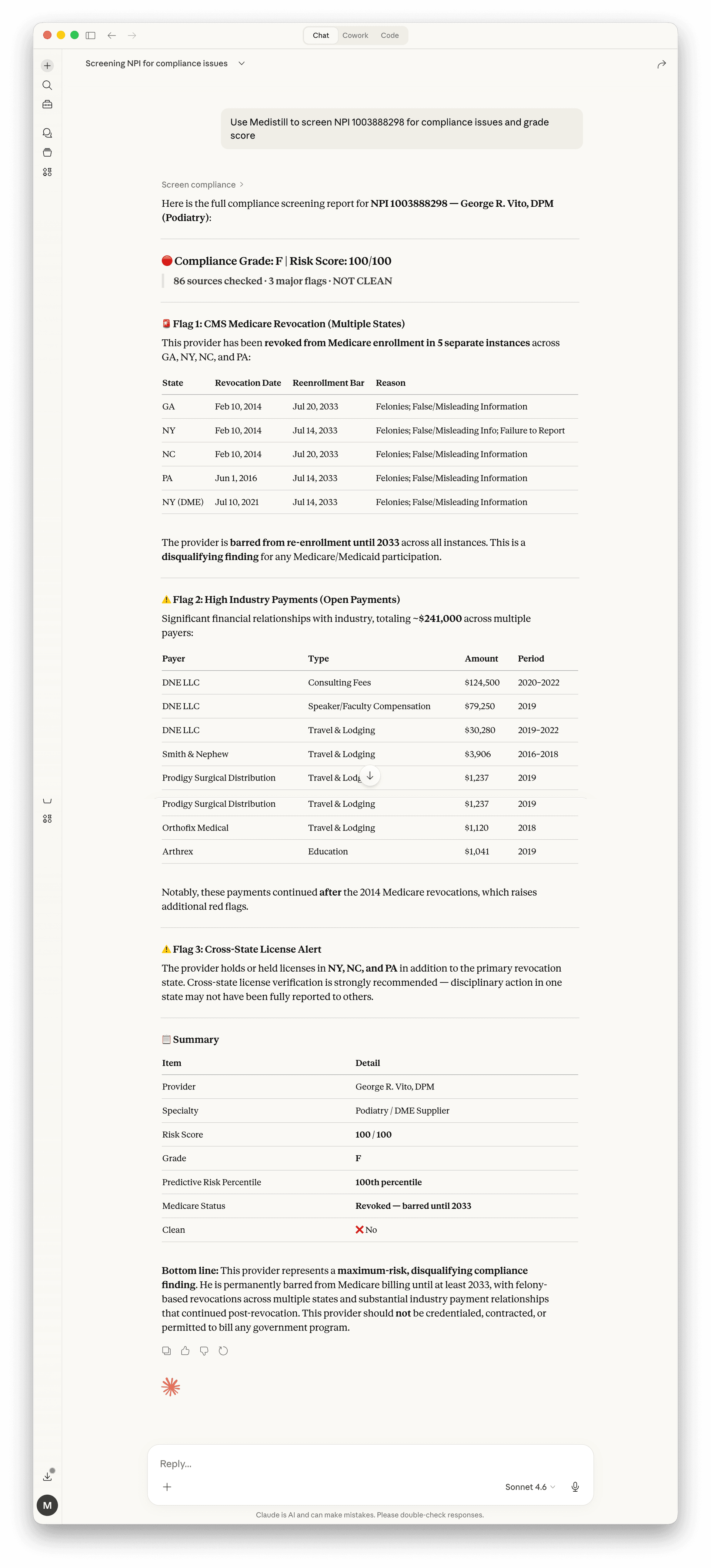
Every screening returns a risk score from 0 to 100 and a corresponding letter grade. The score is calculated based on the severity and recency of findings across all checked databases.
| Grade | Score range | Meaning |
|---|---|---|
| A | 0 -- 10 | No flags detected |
| B | 11 -- 30 | Minor informational findings |
| C | 31 -- 50 | Moderate concerns, review recommended |
| D | 51 -- 75 | Significant flags, investigation needed |
| F | 76 -- 100 | Critical exclusions or actions found |
The screening report checks every database and flags any matches with details including type of action, date, and current status. Key sources include:
OIG LEIE
Federal exclusion list maintained by the Office of Inspector General
SAM.gov
System for Award Management exclusions and debarments
State medical boards
Disciplinary actions from 50 states + DC
FDA enforcement
Drug and device recalls, warning letters, debarments
CMS penalties
Nursing home penalties, Medicare opt-out, special focus facilities
NPDB
National Practitioner Data Bank adverse action reports
For credentialing workflows, you can screen up to 100 providers at once. Provide a list of NPIs:
Use Medistill to screen these 50 NPIs for compliance: 1234567890, 0987654321, 1122334455 ...You can also paste NPIs from a spreadsheet. Claude will parse the list and screen each provider, returning a summary table sorted by risk score.
After screening, ask Claude to export the results:
Export these results as a CSVGenerate a compliance report for our recordsNext guide
Dashboards and Reports